iBrake - brake efficiency test

The only three-step brake efficiency test tool:
-
-DRIVE to any speed you want
-
-Apply full BRAKE in safe conditions
-
-Look at the RESULTS
How does it work?
Your iPhone/iPod Touch features a three-axis accelerometr, which is primarily used to detect the screen orientation. When you rotate the device, the accelerometer senses the changes in the direction of the gravity force. Well, when you accelerate or brake with your car, another acceleration component (let’s call it A) combines with the gravity force (always present), and the accelerometer senses the total acceleration.
As far as we are interested in, only A matters. Its value is a measure of how “powerful” are the brakes of your car or vehicle. The higher the value, the better the braking performance.
What is the braking efficiency?
The automotive industry commonly refers to braking performance in terms of “efficiency”, which is the ratio of A to the gravity acceleration (9,81 m/s^2), expressed in %.
For example: Efficiency = 65% means that A = 0,65 * 9.81 = 6,38 m/s^2
Braking efficiency check is mandatory in most countries; the minimum acceptable value is usually 50%, but depends on local legislation.
HOWEVER the methods and instruments used in workshops to measure brake efficiency always check it at very low speeds (about 5 km/h), and often only one axle is measured a a time! In order to have a better, realistic measure of on-road performances of your brakes, an on-road methos has to be used, as iBrake.
Step-by-step instructions
Just after installation iBrake needs to be calibrated, in order to provide more accurate results. The calibration reference is the gravity force, which is the same anywhere. To do this:
-
a)Place the iPhone/iPod Touch on a flat, horizontal surface (e.g. a table)
-
b)Double-click on the bottom-left button, and orientate the device as required.
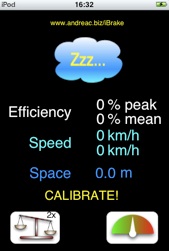
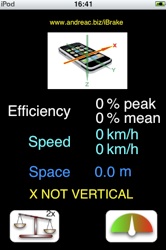
For ease of operation, the software will tell you if orientation is correct or not. When it is, a countdown will start. Keep the device as steady as possible during this time. The operation will be repeated three times, one per each axis (X, Y, and Z).
Watch calibration video!
IMPORTANT NOTICE: iBrake measures the brake efficiency with an accuracy which depends upon iPhone/iPod Touch performance, calibration accuracy (see below), and test execution. WE DO NOT HAVE ANY CONTROL OF THESE FACTORS, AND MUCH OF THE ACTUAL TEST PERFORMANCE DEPENDS ON THE USER. ALSO, BRAKING EFFICIENCY IS GREATLY INFLUENCED BY ROAD CONDITIONS, TIRE WEAR, AND OTHER FACTORS. ALWAYS REFER TO AN EXPERT TECHNICIAN WHEN INTERPRETING THE RESULTS. IN CASE OF DOUBT, E-MAIL US. WE’LL BE GLAD TO HELP YOU!
Now you are ready to drive and brake.
-
a)Place your iPhone/iPod Touch in a visible, reachable, firm position in the car, close to you (e.g., on the dashboard, close to the gear lever, etc.). It is extremely important that the device does not move during the entire test. Help with some adhesive tape, if necessary.
-
b)Prepare yourself to accelerate quite sharply up to the desired speed (e.g. 40 to 100 km/h, usually), and brake up to the ABS intervention. This requires a road as straight as possible, and safe traffic conditions. Check safety conditions carefully before braking sharply!
-
c)Now press the TEST button (the bottom-right one): drive and break! iBreak automatically detect the braking phase.
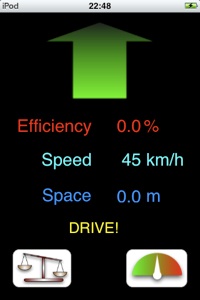
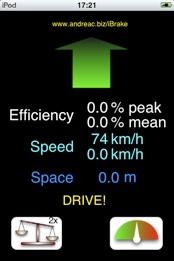
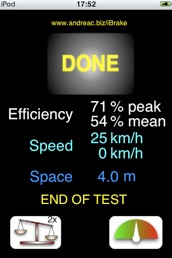
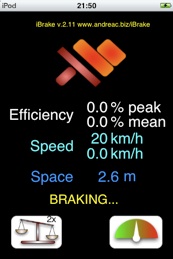
Here is a sample sequence, left to right, top to bottom:
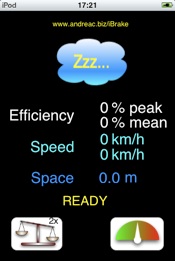
You are given PEAK and MEAN EFFICIENCY results; also, vehicle speed at start of braking and end of braking is shown (if you brake sharply, the latter will be always close to zero; if otherwise, it means that braking deceleration was too low well before the car stopped: it may be a matter of the iPhone which moved from its original position when braking, a problem with brakes, or with the operator as well - please e-mail us for any doubt), along with braking space between the two given speeds.
New! Software version 2.11 now available. It fixes some minor bugs which could invalidate the test in some peculiar cases. Also, measurement precision is improved.


DEVICE ORIENTATION - pay attention to the Home button!
You can repeat the calibration procedure whenever you want (we recommend at least once per month). Total time required for calibration is just 30 s.
IMPORTANT: iBrake has been superseded by CarCheck, and will be removed from sales by end of the year.